Tag: technology

  • The Worrying Trend From Apple: Protect the iPhone.

    Apple Watch Independence

    A year ago, Bloomberg’s Mark Gurman released a story about how a few years ago Apple was working to bring Apple Watch compatibility and the Health app to Android devices before ending the project so that the company could protect iPhone sales.

    I suspect Apple began working on this feature in 2018 and while we didn’t get- and still haven’t gotten- Android support, I suspect these development efforts did start to materialize with the introduction of the dedicated watchOS App Store app in watchOS 6 (2019), the introduction of Family Setup in watchOS 7 (2020) and was probably meant to be part of watchOS 8 (2021) before getting scrapped.

    watchOS 8 placed a pretty big focus on communication with the introduction of features like a redesigned Photos app to make it easier to view and share photos with others. The ability to share music with others in the Music app. A redesigned Home app to make it easier to control your smart home from just the Apple Watch. A new Contacts app to add new phone numbers to your contacts list. And Find My to locate your devices and friends.

    All of these are features you’d want to add if the goal was to make Apple Watch owners able to work independently if they couldn’t rely on having an iPhone.

    Did you take a photo on your Android and save it to iCloud? Now you can easily share or view on Apple Watch. Want to stream Apple Music without a phone at all, but share a really cool song you want a friend to know about? Share it from Watch. Did you meet someone new and want to swap numbers? Just open up the Contacts app and add away. Misplace your AirPods? Now you can find them with Find My on the Watch.

    But this isn’t what ended up happening. Instead we got the features, which is nice, but can more easily and reliably use iPhone to do them instead. And since you need an iPhone, there’s no reason to use your Watch.

    This is part of a troubling trend Apple has displayed over the past several years- both from an innovation and business perspective. The trend is Apple doing everything they can to protect and increase sales of iPhone, even if it comes at the expense of other Apple products.

    If we stick with Apple Watch for a moment, this approach means that the install base of Apple Watch can only ever be as big as the install base of the iPhone. So if iPhone sales ever stall or decline, all other Apple hardware and services growth potential, as a result, stall or decline as well.

    This creates a system where you need one specific Apple device (iPhone) in order to gain entry to the wider ecosystem, rather than creating a system where it doesn’t matter what Apple device you start with and using that to gain entry to the wider ecosystem.

    Echos of the Past: The “Post PC Era”

    In the early 2000s, we were in what Apple described as the “PC Era”, a world in which the personal computer (usually a desktop, but could be a laptop) was the center of users digital lives. Every new device or service Apple introduced relied on the use of a PC. iPod had to be synced, backed up, and purchases made on iTunes (which required a PC) had to be transferred via a wired connection. And when the iPhone rolled out, it worked the same way. It had to be managed from a PC. Even the iPad at launch had to be managed in this way. But starting in 2011 with the introduction of iCloud, Apple brought PC independence to their devices. You could buy an iPod, iPhone, or iPad and login with your Apple ID (now Apple Account) and get all your information right from the cloud. Commonplace today, but in 2011, a pretty bold idea. This independence from the PC helped to spur sales of iPhone and iPad and led to what Apple called the “post PC era”. Or as we can probably more accurately call it, the “mobile era”. The mobile device in your pocket had the same if not more importance as the PC did in the previous decades.

    What we are seeing now is an echo of the past. We are moving into what can be described as a “wearable era”. People want devices they can wear. Watches, rings, glasses, headsets, wireless earbuds, and these are just the most common devices right now. Some are more developed than others, but growth is expected in all these areas over the coming years. Apple is hold fast to the mobile era and requiring their mobile devices to be a gateway to the wearable technology, but many companies are bypassing Apple entirely and just building these devices to work independently of what phone you have. Over time, unless Apple changes, I worry they’re going to get shoved out of the “wearable era” because they’ll never allow their wearables to get good enough to replace the iPhone.

    I can extend the same argument to home devices like HomePod, which require an iPhone or iPad to setup and connect to the internet. As growth of smart home accessories increase, Apple risks missing out on big parts of the market by not supporting other platforms or taking a leap over the competition by not requiring a mobile platform to setup at all. AirTag requires an iPhone or iPad to setup and locate, it can’t be done on any other device or platform. I can even make this argument about Apple Vision Pro, despite Apple claiming Apple Vision Pro is a “fully independent computer”. It really isn’t since you need an iPhone or iPad with Face ID to scan your head and get a head band size. Some Apple device is required and specific models at that.

    The Loss of the Self-Canibalization Mantra

    Steve Jobs once said, “If you don’t cannibalize yourself, someone else will”. This idea is all over the early 2000’s products Apple put out. Howard H. Yu summarized this well in his 2016 essay, “Apple’s dwindling sales show importance of self-cannibalization”. He wrote, “In 2005, when the demand for the iPod Mini remained huge, the Nano was launched, effectively destroying the revenue stream of an existing product. And while iPod sales were still going through the roof, Jobs launched the iPhone which combined iPod, cell phone, and Internet access into a single device. Three years after the iPhone’s launch, iPad made its debut and raised the prospect of cutting into Mac desktop computer sales.”

    This mantra is no longer at Apple. Nothing is allowed to devour the sales of the iPhone. It’s the reason why Apple Watch, no matter how capable the hardware becomes or advanced the software gets, it’ll always have to play second fiddle to iPhone. It’s why users can’t even pair an Apple Watch to an iPad; protect the iPhone. It’s why Apple News Plus Audio Stories are only on iPhone. It’s why Apple backtracked on Apple Fitness Plus requiring an Apple Watch, so iPhone users could pay the subscription fee. It’s why things like AirPods pairing is seamless on iPhone but not on Mac. Or why AirTag setup isn’t allowed on a Mac. Originally, Apple Arcade titles had to be playable on all Apple devices, but after a year or so, they backtracked and allowed games to be iPhone only.

    Everything has to ship on iPhone to protect its revenue. Nothing can cannibalize the iPhone. When it was introduced in 2007, the iPhone changed the way Apple thought about their products. 18 years later, and it seems like the thinking is still the same.

    Addendum

    Since initially wiring this post, Apple has displayed another instance of this behavior. On February 4th, Apple introduced the Invites app. An iPhone only app that allows you to create and share an event invite to people via iCloud. This app does work on iPad, but in the classic ‘iPhone mode’. This trend is reminiscent of other recent Apple developed apps. The Sports app is iPhone only. Journal is iPhone only.

    Apple Music Classical initially launched iPhone only in March 2023 and was brought to iPad 8 months later and just 3 months ago was expanded to CarPlay and work with Siri. It continues to be unavailable on Watch, Apple TV, Vision, Mac, Android, and the web. All platforms that Apple Music is already available on.

    Some apps, even though they may be available on multiple platforms, don’t function the same. Audio Stories, a feature available to Apple News Plus subscribers, are only available on iPhone. Not iPad, Mac, Watch, or Vision. Fitness on iPhone has a suite of features including viewing your Activity ring history, trainer tips from the Apple Fitness Plus trainer team, and ring sharing activity. None of this available on any other platform.

    It goes to show not only a shift in the way Apple is trying to protect the iPhone, but a shift in the way Apple approaches app development. That anything other than iOS isn’t worth creating apps for. What kind of message does that send to the developers that Apple is trying to court to create visionOS apps when Apple themselves don’t see value in developing for it?

  • Apple Intelligence Review (iOS 18.2)

    18.2- Image Based Tools

    With the recent release of iOS 18.2, Apple continues to rollout new Apple Intelligence features. Compared to the weak and lackluster initial rollout with iOS 18.1 in late October, this second phase is more noticeable and a bit more impressive. However, I continue to struggle to find way to work Apple Intelligence into my life in ways that help me express myself and be more productive.

    Genmoji

    Let’s start with Genmoji. This is one of the more fun features offered by Apple Intelligence, and could have been a breakthrough for adoption of Apple Intelligence, however it doesn’t do much. As such, it doesn’t really move the needle.

    If you watched this catchy ad by Apple and tried to generate any of these Genmoji’s, you probably didn’t get any of the same results.

    For example, I tried to regenerate the tomato spy emoji and I got something VERY different. Not only did I get nothing related to a tomato, I got promoted to use my sisters photo as a reference. Which is absolutely bizarre to say the least.

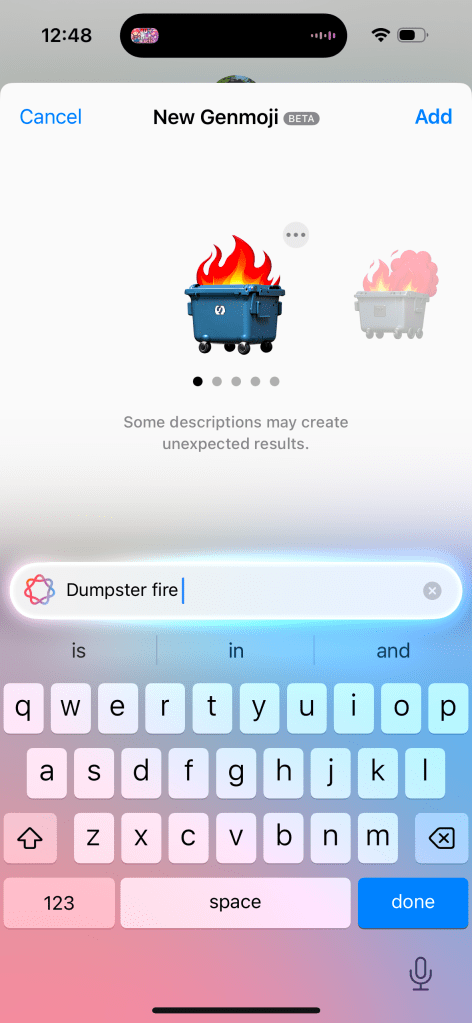
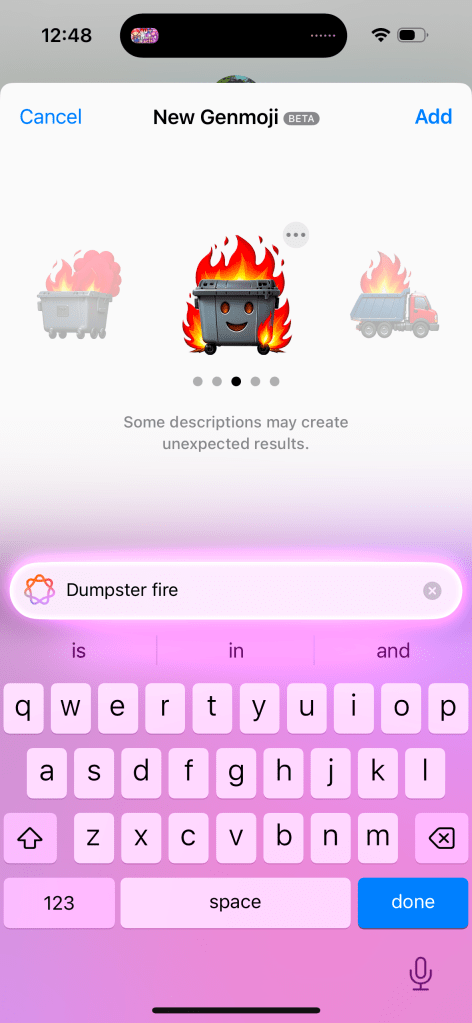
    The 12 sided die only generates a standard 6 sided die. Can of worms can get some decent results, but it requires a relatively extensive prompt. More extensive than is suggested by the ad or promotional material or even the size of the search box. You can get some decent results, like the one I generated for a dumpster fire (full disclosure, this has quickly become one of my favorite emojis to send) but some options have oddities- like adding a smiling face to the dumpster.

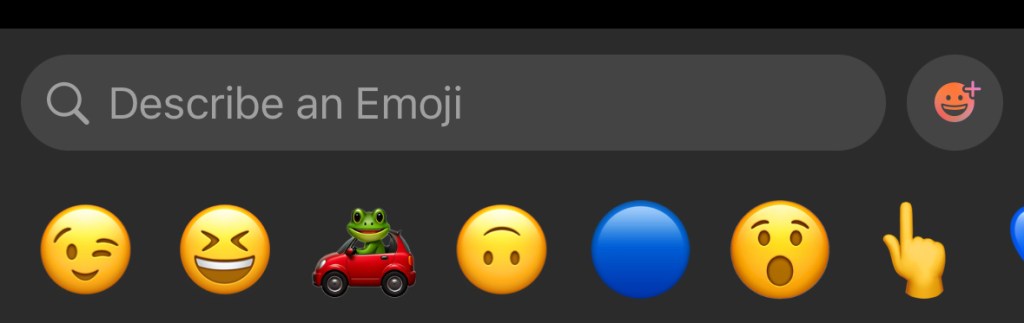
    The interface for Genmoji is functional and easier to find than the Writing Tools in my opinion. But I don’t think Apple has nailed this. You open your chat or text field and hit the Emoji button. Then you need to hit the button that has the Emoji face with a plus icon and the Apple Intelligence glow around it, and you can enter your prompt. This tiny button is next to a massive search bar to search for an already existing emoji.

    I’m not sure why the search bar and the Genmoji button are two different things. I feel like it’d be more intuitive to go search for an emoji and then if it finds a match, it’ll present that to you. But if it can’t find a match, then it’ll generate an emoji to use. Maybe this can be improved upon in iOS 19.

    The final thing to note about Genmoji is that it’s only on iOS and iPadOS. macOS is excluded at this time for some reason. It’s an odd omission considering all the previous Apple Intelligence features landed on all platforms at the same time. Not sure why this one didn’t. Also sending Genmoji via Messages to anything but another iMessage user is not a great experience. It’ll just send a large PNG picture to Android users and are entirely unavailable in other apps.

    Image Playground

    This is one of the most un-Apple like implementations of a feature I’ve ever used. And people beyond me have pointed this out. The icon does not convey it is the quality of an Apple created app. And when using the app, it doesn’t feel like a first party Apple app either. Some people on Reddit and Bluesky have even mistaken it as a scam app or one of those microtranscation filled kids games from the App Store.

    This app is interesting. When you go to generate an image it’ll ask you to enter a text prompt (just like Genmoji, though note, you can’t create Genmoji in Image Playground), select a person to use as a reference, and you can select some pre-curated options to customize your image further without needing to enter a specific prompt. These options range from things like”disco” or “winter” to costumes like “astronaut” and chef”, accessories like “sunglasses”, and places like “city” or stage”.

    Selecting just one option or a person or a single prompt will allow the model to begin generating your image. You can select an animation style (think Pixar) or an illustration style (think like a holiday card). To Apple’s credit, they do not allow you to generate a photorealistic image. So this really is more of an entertainment thing that is good for laughs more than anything.

    The results aren’t great. I’ve included some examples above. The first one is using the disco, fireworks, starry night, and text prompt “add the text 2024”, and it looks alright. I generated this with the intent of using it for a year-in-review- kind of post. The second is based on a photo of myself and the “astronaut” and “starry night” prompts. It’s fine, but my hair is very, very wrong stylistically (this has been widely reported as an issue with Apple Intelligences model) and its on the outside of the same helmet. In addition, the skin around my neck is clearly visible and not covered by the space suit. The third is a couple text prompts describing a modern home with hardwood floors and at a glance it’s nice. But when you take a closer look you can see all kinds of errors with the legs on the table, the pillows on the couch, and the table on the left looks weird.

    The real takeaway from Image Playground is it has no useful purpose. What would you want to use this app for? I haven’t found a purpose and neither has anyone else online either.

    Image Wand

    This is basically an extension of Image Playground. The difference is instead of exclusively using text and suggested themes to generate an image, you can draw something in an app (like Notes) using Markup and then circle it to give Image Playground a head start on what you are looking for. You can then augment the sketch with text prompts, or if Apple Intelligence cannot determine what your drawing was, it may ask for more information about your sketch before generating more options.

    Putting aside the creative encroachment for a moment, I have two issues with this feature. The first is that I frequently need to give more than just my sketch to the model before it can start generating something. An elementary drawing of a house asks me to describe to what I’ve drawn. That’s pretty disappointing and not very productive.

    The second is that it just as often takes my sketch and goes a mile with it. My elementary house sketch that I really wanted to use Image Wand on to make look a little nicer, just generates an entire house design concept with the AI generated image oddities we’ve all seen before online or in the Photos Cleanup Tool. The result I get often bears little resemblance to what I started with. I often complain about Apple Intelligence not doing enough, but this is a case of it going too far without a way to reel it back in.

    ChatGPT Integration with Siri

    I don’t have much to say about this one since I have this turned off as I don’t want to share any information with Open AI and, as this post has probably indicated, I’m just not an AI fan in general. But the idea here is that if you engage with Siri in a way that Siri can’t respond to, that data will be sent to ChatGPT and that information will be supplied back to you via Siri. It’s a crutch to making Siri look more powerful than it actually is.

    While on this subject, Apple has been super disingenuous with the Siri improvements in iOS 18, their marketing of the iPhone 16, and Apple Intelligence. All the marketing advertise…

    1. The new Siri interface, which is worse than the orb
    2. New Siri functionality, which does not exist
    3. And uses the Siri + ChatGPT to make Siri look better than it actually is

    This is a trend that is very un-Apple like and I hope does not return with iOS 19 and the iPhone 17 lineup.

    Writing Tools Improvements

    While Writing Tools was first introduced with iOS 18.1, Apple has gone back and improved this set of tools a little bit. The missing ‘Describe Your Change’ feature, where you could describe a type of change to make to your text is now available. This can be achieved by using Apple Intelligence, however it can kick your request and the associated text to ChatGPT if the request you make is outside of Apple Intelligences capabilities. The benefit here is users can get a better result, or at least a result more in line with their expectations, but the downside is confusion to the user as to what Apple Intelligence really is. If Apple Intelligence is marketed as a rival and superior option to ChatGPT, Google Gemini, or Meta AI, but Apple Intelligence regularly kicks you out to use one of those options, then what’s the point of Apple Intelligence?

    I do want to note that at the time Writing Tools was introduced, I pointed out just how difficult it was to even find or use and this hasn’t changed substantially, but is a little bit better for people who use Pages. Pages now has a dedicated Writing Tools button in the toolbar- making it easier to access but not any easier to use. For example, if I describe a change but don’t like the result, it’s not easy to go back and change my prompt. One of the options for advanced proofreading I previously complained didn’t work in real time and it still does not. I’d love to know just how widely used these tools are because I’d be quite surprised if it is widespread.

    Visual Intelligence

    This is an interesting feature in that it is one of the few Apple Intelligence features exclusive to the iPhone 16 and iPhone 16 Pro. It’s not on iPhone 15 Pro. The way this is invoked is by click and holding the Camera Control button . I do not know why, but limiting this feature to just iPhones with Camera Control is kinda dumb.

    I also don’t think this feature is very impressive. After you open Visual Intelligence you are presented with an Apple Intelligence animation-ified Camera interface where you can click an ‘Ask’ or ‘Search’ button to ask ChatGPT about what you’ve taken a picture of or do a Google Image search for what you’ve taken a picture of. Neither of these, obviously, utilize Apple Intelligence. It’s the ChatGPT problem all over again from the Writing Tools.

    You can get information about things you’ve taken a picture (like what breed a dog is) but I don’t think this uses any new Apple Intelligence functionality, but rather piggybacks off the Visual Look Up feature Apple introduced to the Photos app in iOS 17. Visual Look Up works by scanning your photo and identifying what is in the photo and provides you Siri Knowledge and related web results on what has been identified.

    Apple Intelligence Mail Categories

    This is maybe the best use of Apple Intelligence so far. The Mail app has gained four inbox categories- Primary, Transactions, Updates, and Promotions. Then based upon the emails you receive, Apple Intelligence will automatically sort your mail into one of those four categories. The Priority category from iOS 18.1 remains as a sub-category within the Primary category. Visually this is really nice and can help to have those promotional messages that you don’t need to know about but don’t want to miss out on either in your mind without feeling like you need to take action on immediately.

    The bad news is twofold. First, Apple Intelligence doesn’t sort these messages by message content, it still bases its sorting on who the sender is. If I place an order from Dominos for a pizza, I’d expect the order confirmation with the delivery time to be shown in Primary as a priority message since it’s message contents have a time associated with it. But the promotional “get your free pizza” email, that I’d expect to another one of the categories like Promotions. At the same time, maybe Updates is more appropriate? It’s not a Transaction, but could lead to a transaction.

    It feels like Apple put themselves into a corner by pre-selecting these categories rather than having Apple Intelligence dynamically create categories based upon what is in your inbox. And basing the categorization by sender creates problems for different kinds of emails you can get from the same sender.

    The other problem is that this Mail app is exclusive to iOS. You can’t view your email with these categories on iPad or Mac. This is especially disappointing on Mac where most emails are created and viewed. And it’s just a baffling omission from iPad since iPadOS and iOS are virtually identical. Guess we’ll have to wait for another future software update.

    I will end on one last positive. While I have issues with the way Apple Intelligence sorts my mail, I do overall like the feature. But if you don’t, it is super easy to switch back to the traditional single-inbox experience. Just tap the More button in the upper corner and you can instantly switch between the two styles.

    Overall Thoughts-

    Based on my extended time with the first wave of Apple Intelligence features and the overall impressions of the second wave of features, there are a couple trends that are becoming very clear.

    First, the investment Apple has made into Apple Intelligence has seemingly not been worth it and I struggle to see how these image generative tools benefit users or help Apple build future products. Look at Image Playgrounds- an app that has no functional purpose to exist and is commonly mistaken as a scam app. Image Wand is a feature that is sure to met the ire of Apple’s creative customers. And if so many of the Apple Intelligence features have to be sent to ChatGPT, what is the benefit of Apple building their own AI models? Other companies have show that AI products like the Rabbit R1 and Humane AI Pin are just kinda pointless. So there’s nothing hardware or platform wise Apple can build with AI.

    Secondly, it is becoming clear that users do not understand what Apple Intelligence is or how it works. I saw a Reddit post a month or so ago of someone who “hacked” Apple Intelligence onto their iPhone 13 and demoed the new Siri animation and re-write features that used ChatGPT, not Apple Intelligence. What people thought they were getting with Apple Intelligence was a chatbot integrated into Siri and what we got was very much not that. Leaving users confused about what AI even does or is for. While Siri improvements are supposed to be coming next year, the damage has likely been done to Apple Intelligence’s reputation. And all the Siri improvements are dependent upon adoption of the App Intents API Apple has made available. Back in 2016 with iOS 10, Apple greatly expanded the uses of the Siri API so more developers could plug their apps into Siri. That never happened though and many of the features Apple showed at WWDC that year never shipped or have been discontinued.

    Third and finally, very few Apple Intelligence features are well implemented. This is incredibly concerning from a company like Apple who got to this point by shipping complete and polished experiences that are intuitive and easy to use. Nothing about any Apple Intelligence feature has been complete (as evidenced by its piecemeal rollout), polished (as evidenced by how often they have to rely on competitors AI models to do work for them), intuitive (as evidenced by how hard it is to find a lot of these features in the first place), or easy to use (since you have to already know how to prompt AI to get a certain result). Apple has been under fire for years with questions about their ability to deliver experiences like they did in the Steve Jobs era and I am more confident than ever that Apple has indeed lost their way and are just chasing trends.

  • Apple Intelligence Review (iOS 18.1)

    Apple Intelligence Review (iOS 18.1)

    18.1- Text Based Tools

    It has been over a month since iOS 18 released to the public and since the iPhone 16 launched. iPhone 16 was billed as ‘the first devices built from the ground up with Apple Intelligence’ so this should make your device feel much more complete. At WWDC, Apple Intelligence was sold as ‘a service to help you get things done effortlessly’. And we now finally have it! Or at least, some of them. Apple is slowly rolling out Apple Intelligence in waves and this is just the first of several. This going to be a slow rollout. The vast majority of Apple Intelligence features first detailed at WWDC and at the iPhone 16 reveal won’t be available until next year. So iOS 18.1 primarily just brings what can be described as the text based tools to iPhone, iPad, and Mac. So let’s go through these first few features and discuss how helpful they are.

    Writing Tools-

    These are the main draw of this update. These tools are meant to help you proofread your text, rewrite the text, adjust the tone of your text, and help you summarize your text, everywhere you can input text in iOS, iPadOS, or macOS. It’s not limited to Apple apps.

    Writing Tools encourage you to summarize and re-write text that has already been written. Very little of the Writing Tools are actually generative like ChatGPT is. With a few exceptions, you cannot use Apple Intelligence to generate text. It will only re-write or summarize what has already been written.  

    If you want to make an email you wrote shorter or sound more friendly, you have to manually select ALL the text from the email you want Apple Intelligence to rewrite or proofread and select the Apple Intelligence icon and select what you want it to do. There is no generative or proactive way to do this so you can on-the-fly adjust your language or fix errors. So there’s no real time savings going on here.

    Selecting text can be awkward depending on what device you use. If you’re using a Mac, this is pretty easy. People have been selecting text on the Mac from many different apps for decades. But on a device like iPhone, this can be much more challenging. Getting the Apple Intelligence icon to even come up. Sometimes the Apple Intelligence icon will popup, but not always. Many Apple Intelligence tools are just hard to find — excluding the Notes app which has a dedicated button for some reason. Some other apps like Mail have one too, but again, it’s hidden behind an option and among many other icons. It doesn’t really stand out.

    Once you’ve done your action, it replaces the text you selected to re-write without a way to easily compare to the original and see what has changed or describe a change you want Apple Intelligence to make to refine the rewrite (despite promotional images showing this as an option).

    The Writing Tools options as shown in A17 Pro iPad mini marketing images in October 2024.

    You have to either keep the changes and re-select the text, click the ‘try again’ button, or undo the Apple Intelligence changes and make some text adjustments you want, then re-select the text and do the whole thing over again. It’s not very intuitive nor easy to use, and ends up being more of a time sink than just re-writing the text yourself. 

    Since the start of the 18.1 beta, I have had to go out of my way to try using these tools. My biggest problem is that none of these tools are proactively presented, nor are they very useful or helpful. For being the headlining feature of this update and the first of the Apple Intelligence suite of features, I think these are among the worst set of tools available.

    Summarize Notifications-

    This is probably my favorite feature from iOS 18.1. If you have 2 to 3 notifications from a single app, it’ll stack them together and summarize the contents of those notifications into a short summary. Tapping the notification stack expands out the full notification. If you have a notification that can contain a lot of text, like a Teams message, that message individually will be summarized. This is a really nice feature and I have enjoyed getting the main point of everything without needing to look at everything. This carries over to watchOS as well for notifications that originate from iOS and are mirrored to Watch. Native watchOS notifications won’t be summarized.

    The downside is if you get more than 3 notifications from the same app, Apple Intelligence will just give up and do what it’s done in iOS 17 and earlier and just display the top message and say ‘+3 more from Mail’. I don’t know why the limit is 3, but it seems to be for some reason. These summaries are usually pretty accurate, but not always. Overall, I like this feature a lot and find it to be the most useful and helpful of the suite.

    Email Summaries-

    Similar to Notification Summaries, these are alright too. Tap the summarize button in Mail and it’ll summarize the content of the email. This are usually fine, there are some issues with phrasing or conflicting information but you can usually get the idea. 

    Like Writing Tools though, the worst part is how hidden this feature is. You have to tap on an email, swipe down, tap the summarize button, wait 5 seconds, then get the summary displayed to you. It’s usually not faster than just reading or skimming the email yourself.

    Reduce Interruptions Focus-

    This feature works in 2 ways. There’s a dedicated Focus mode and a Reduce Notifications option that can be turned on for other Focus modes. The goal being that it uses Apple Intelligence to help determine if a notification is truly important or not.

    The Focus Mode itself works in that it certainly does reduces the number of notifications I get; it is nice to switch on an hour or so before I go to bed and it works well to help me wind down and distance myself from my phone. As an option for other Focus modes, it kinda sucks. I’m not totally sure it works to be honest. In my Personal focus, I don’t allow messages from certain work contacts, but it also silences all my other contacts that come through normally and I would want normally. So I end up missing messages from my mom or sister for example and that can be really annoying. 

    New Siri UI-

    This is a weird one. Siri is mostly unchanged from before, but with a screen wrap animation.

    This new Siri animation is fine. I find it to be slower and less responsive than the orb, but it kinda looks nice? I don’t know, it’s fine. No strong feelings. I do have strong feelings on this for CarPlay though. When using Siri with CarPlay, I do actually think it’s a downgrade. It’s a lot harder to tell without looking at the screen if Siri is listening to you or not. On Mac, there is no screen animation that plays, it just displays a text box for you to type to Siri directly and the bar glows. The ability to ask multiple questions back to back and Siri remaining aware of the context is nice and better than previous versions. 

    Type to Siri-

    This is nice. It’s always been an accessibility option, but having it built into the OS as a default is great. Double tapping the home bar can be a little awkward, but the initial glow animation after tapping once is great to show that you can interact with it in a new way to invoke something related to Siri and Apple Intelligence. It oddly doesn’t share the same Siri screen wrap animation, instead it shrinks the app you’re using and puts a glow animation over the keyboard and Siri text box.

    Unfortunately, some of the auto correct suggestions are just dumb. I typed “Set a time” and Siri responded (via text) “For how long?” I began to type “15” and one of the suggestions was ounces. If I just had Siri set a time and it just asked for how long, why would it suggest anything other than measures of time? For a feature that is billed as “helping you get things done effortlessly” and “drawing on context” and “a new era for Siri” we sure aren’t off to a great start. 

    Cleanup Tool-

    This works as long as your edits are small and in the background. The bigger the thing you want to remove and the closer to the subject it is, the worse it will do. It’s not hard to get a really bad result. I got more bad results than good ones. And the good results aren’t “amazing”. Below I’ve attached some pictures from my library using the cleanup tool to remove some elements I think people would commonly want to remove from photos. Originals are on the left, cleaned up are on the right.

    Photo Memories-

    This one is actually pretty good too. You can describe the type of memory you want to create and Photos will pull photos and videos from your library that meet that criteria and assemble a short video for you. The animation is top notch and it usually puts together a pretty decent result. No major complaints here. While it is nice, I don’t think it’s significantly better than the ones iOS automatically puts together for me and that don’t require Apple Intelligence to create.

    Phone Call Recording & Transcription-

    This may or may not be an Apple Intelligence feature, but it was advertised as one at one point, so let’s call it an Apple Intelligence feature for the sake of argument. It’s bad. Like, REALLY bad. I am fundamentally opposed to Apple even allowing phone call recording for all the privacy and legal concerns it presents. Apple has tried to address this – Siri will announce after you start the call that the phone call is being recorded, and that plays for all parties on the call- but there’s no way to opt out beyond hanging up. And if you get transferred from one party to another, I don’t know if the announcement plays again. So you could be in a situation where someone doesn’t know they are being recorded.

    Secondly, in the testing I did the transcript was fine, but it often didn’t break it up by who was speaking. So discerning who said what was hard to do. Some whole sentences are missing. But the summary is awful. The conversation I had was about phone call recording being creepy and ending work for the day. The summary generated was… “Requests a bump on a log to collapse”. Um…

    Hide Distracting Elements-

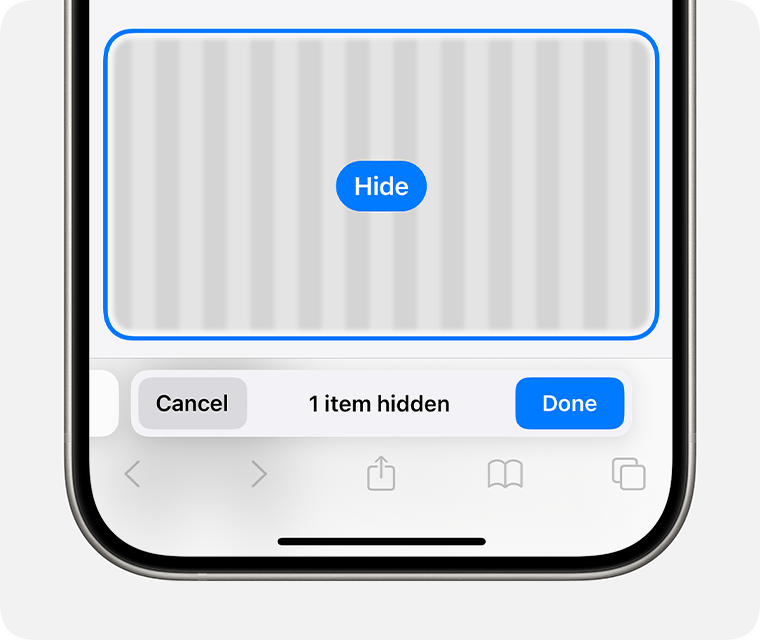
    This isn’t really an Apple Intelligence feature, but where else am I going to talk about it? The animation is cool and it does work. I can hide all those annoying popup ads that prevent me from getting at the content on a website. You may be wondering why not just use reader mode? Reader mode isn’t supported on all website and sometimes destroys context around something that was written. So this feature has merit. But again, iOS isn’t doing this automatically for you. You have to hit the buttons and select the option and manually choose what to remove.

    So you end up reading the whole page anyway while you decide what to remove, and by this point, what was the point? I’ve hidden all the popups for what? It doesn’t save this for if you reload the page or come back to it later. You have to go through the whole process again. It’s a waste of time. 

    Overall Thoughts-

    I’m not impressed. All of these features do “work”. It’s not like anything is blatantly broken- with the exception of the Cleanup Tool maybe. But things certainly don’t feel finished, or tested, or well implemented. Apple isn’t doing anything new here and they aren’t doing it in a new or different way. It does all run on-device as far as I can tell, but there’s no indication when something is happening on-device or in private cloud compute (PCC). Many of these features are, in my opinion, hidden, a gimmick, and/or take more time to setup and use than just not using them at all. Maybe I’m just an old dinosaur at the crisp age of 25, but I really don’t understand a lot of these features. I don’t understand how they’re going to help people or how they provide a foundation for future Apple devices and services. I hope the next round of Apple Intelligence features are better, but I’m not optimistic.

  • Apple Watch Series 10 Impressions

    Hey. It’s been a while. I’m happy to be back to share my initial impressions of this years new Apple Watch- Apple Watch Series 10.

    Let’s start by going over the thing Apple wants people to talk about, the bigger display sizes. If you remember, 10 years ago to the day, Apple announced the first generation Apple Watch with its 38mm and 42mm case sizes. Now Series 10 features massive 42mm and 46mm sizes with displays that absolutely dwarf the Series 3 and earlier models.

    Bigger displays are always great to have and on a device as small as Apple Watch, every pixel counts. But this a trick Apple has pulled before and with only moderate success. The bigger displays of Series 4 worked to drive upgrades, but we had a culmination of other features too. Like the ECG app, the powerful S4 SiP, the Taptic Crown, and the bigger screen. Apple last increased the screen size with the Series 7, but this model fails to drive upgrades as it was really just that- bigger screens. Some people (like myself) were interested in bigger screens and upgraded for that, but most didn’t. I think this is where the next part of Apple’s marketing comes into play…

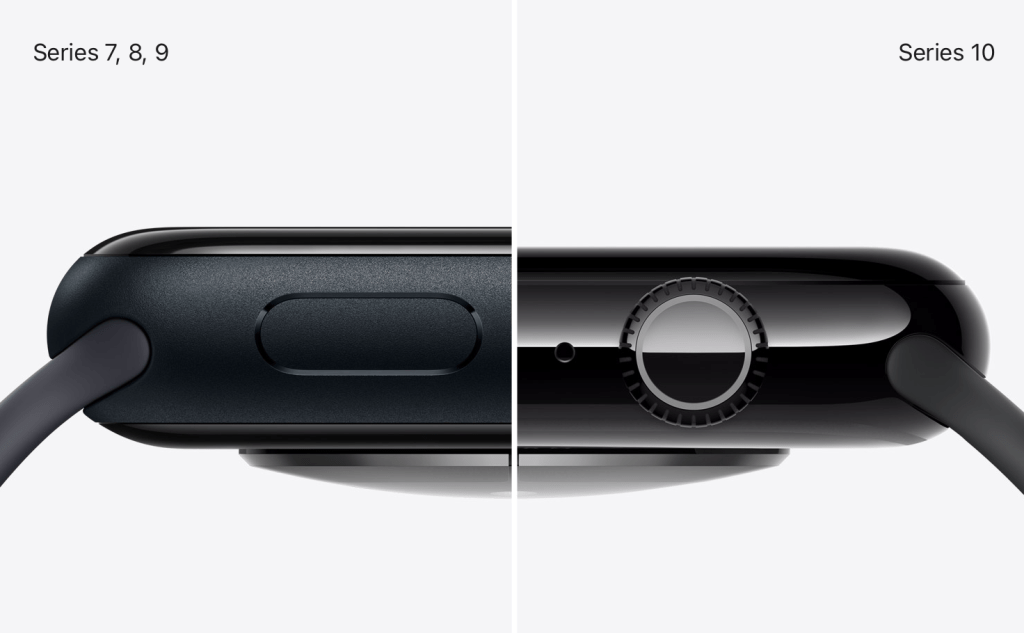
    Apple Watch Series 10 is advertised as being 10% thinner than previous models. This should make the Series 10 more comfortable to wear and less obtrusive on your wrist.

    In this side-by-side, it certainly is thinner, but I don’t know if it’s substantial enough to be noticeable. At the scale of Apple Watch, 10% is 10% and I’ll take it, but I’m not sure it’s going to be obvious. Much like how the M4 iPad Pro is “the thinnest product has made” and that seems to not be driving sales of those devices. But the last time Apple made the Watch thinner was with Series 4. So if Apple is aiming to drive upgrades of Apple Watch, they seem to be emulating the strategy of the Series 4 by creating a new Apple Watch that is both bigger and thinner than before. We’ll have to see if this shakes out for Apple.

    As for me, I am happy to see Apple Watch become thinner and larger, but I feel like we’re hitting the maximum for how big of a device Watch can become. I have a pretty large wrist and wear a 45mm Series 9 currently and I’m hesitant to go much bigger. And extra 2mm might be all I can tolerate on my wrist before having to size down or stop upgrading entirely. I am excited to see Apple returning to a focus on product thinness though, this is a welcome return of the Ive philosophy of design.

    Next, let’s discuss the other hardware improvements. We have a redesigned speaker that is 30% smaller but supposedly retains the same acoustic performance of previous models and is now able to play any audio directly from the Watch- not just phone calls. Yes, my lifelong dream of playing music from my Watch without the need for AirPods is finally coming true! Not sure why this limited to Series 10, but I’m happy this functionality is available nonetheless.

    We also have out first instance of an Apple Watch Ultra feature migrating down the product lineup- the depth and water temperature sensors. This is not the first Apple Watch Ultra feature I expected to make its way into a lower end model, but I guess I’ll take it. Just like with Apple Watch Ultra, when doing a water workout, you can check your Apple Watch to see the water temperature and how deep you are. Keep in mind however, Apple Watch Series 10 does not have improved water resistance, so you can’d go diving with it like you can Ultra.

    Of all the features from the Ultra that could’ve migrated down, this wasn’t near the top of my list, but does suggest Apple is open to brining more features to the base model. Hopefully in the next year or two we can get a bigger battery, or dual frequency GPS, or maybe someday Apple’s growing suite of satellite connectivity features will appear in Watch.

    There is also a new focus on case finishes and materials that Apple hasn’t paid attention to since the Series 5. Aluminum comes in three colors. The classic and neutral silver color that Apple Watch users have come to love. A new rose gold color that hasn’t been seen since the Series 4 and looks quite nice, even if there is no color matched iPhone to pair it with. And, what I expect to be by far the most popular color, a polished and anodized jet black color that looks like it would pair perfectly with the jet black iPhone 7. It looks stunning in Apple’s marketing and if I pick up a Series 10, it’ll be this model.

    Stainless steel is out this year and in is titanium. Very exciting since this also hasn’t been used since the Series 5. The natural titanium looks nice, it will certainly pair well the natural titanium iPhone 15 and 16 Pro. There is a slate option as well which is deftly the darkest option here but doesn’t look black. It almost looks like a graphite color. And gold returns as well, and it looks very nice. Defiantly a gold that would look much more in place with the iPhone XS than our current iPhone colors, but gold is gold, some people love the color. I’d be much more upbeat with the titanium options if they were not polished (they almost look like stainless steel) and if the accompanying bands were also made of titanium and not stainless steel. It contributes to feel of Apple Watch as one product that is designed by one group of people and Apple Watch bands as another set of products designed by another group of people without the two ever communicating. I hope next year Apple develops the Apple Watch Series 11 as a complete package- one where the materials and design and colors all match and compliment each other by default.

    The only other hardware thing to note is that while we have the S10 SiP in this years Apple Watch, I don’t see anything to indicate that it is actually different than the S9 from last year. I expect that the differences are really limited to supporting the water depth/temperature sensors and the new display with no performance improvements to speak of. Disappointing, but unfortunately not unexpected.

    Finally, we actually have a new health feature this year! And one that is going to be more impactful than the temperature sensors. Using the improved accelerometer from both the S9 and S10, combined with the data Apple Watch tracks while you sleep, Apple claims they can detect sleep apnea. This could be pretty big if it works. It is interesting that Apple is using sleep tracking and accelerometer data to do this rather than the SPo2 sensor from the Series 6 onward, but considering it’s patent dispute with Masimo, it’s maybe not too surprising. Once that dispute is resolved, maybe sleep apnea detection will improve.

    This feature combined with the introduction of the Vitals app and Training Load in watchOS 11 (and combined with the other health related features Apple touted in the event itself) makes me think Apple is back to having some comprehensive health plan for the Apple Watch.

    So overall, that is Apple Watch Series 10. I’m overall pretty happy with what we have here. Bigger and thinner, a focus on the Watch fundamentals like design and materials is a welcome return to form. The features are light, but bigger than what we get most years. And the prices remain unchanged which I find to be very positive. I’m hoping I can get some hands on time with Series 10 later this month, and stay tuned for my watchOS 11 review.