
So I’ve been wearing my Series 9 for a little over 3 months now and many of my thoughts on the Watch have changed from initial review in September. At the time, I titled my review as “Coming Later This Year”, due to so many flagship features of the Series 9 not being available at launch. Since then, Apple has made good on those promised software updates and the Series 9 is now doing everything it was advertised as being able to do in September.
So let’s start with the big one; Double Tap. This came in October with watchOS 10.1. Apple advertises this as a “magical way to interact with Apple Watch” and I think that oversells the feature a bit. For some specific functions, I do find it genuinely useful. If a song starts playing that I don’t like, rather than raising my wrist and using my other hand to tap the skip button, I can just raise my write, Double Tap, next song plays. It’s much nicer. Similar for ads in podcasts. Ad starts, I just Double Tap until the ad is over. Sitting at my desk at work and I want to quickly check the news or see if I have any missed message? Quick little Double Tap to bring up and scroll the Smart Stack. This one isn’t quite as “magical” as the other examples as if I want to open Messages or News, I then have to use my other hand to tap the screen.
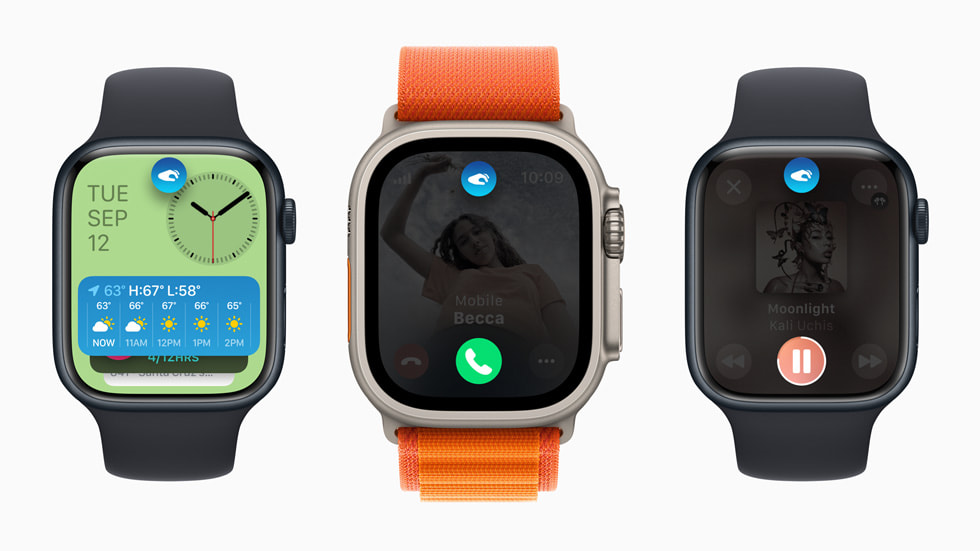
Overall I fond Double Tap to be a handy if not always helpful feature. It doesn’t work everywhere, and third party apps currently have no way to use the Double Tap feature, but I do think Double Tap has a future if Apple continues to support it and update over time. My other hope is that Apple makes the feature more customizable. From the Watch face, the only thing Double Tap does is bring up the Smart Stack. I would personally find it much more helpful if Double Tap brought up Notification Center. It’d also be nice if I could set Double Tap to dismiss notifications, rather than do whatever the first action prompted on the notification is. The best way to tell if a feature is good or not, is to take it away and see if you miss you. When in Low Power Mode, Double Tap is turned off. And when I did have my in Low Power Mode, I did try to use Double Tap and missed it. With time, I could probably adjust to not having it, but I do like it enough that I’d rather Apple keep building on it.
The other big feature that more recently got added with watchOS 10.2 is Siri integration with the Health app. This allows users to use Siri to request information from the Health app and be delivered to you. It works the other way too, for some health related items, you can use Siri to log that information into the Health app. In a press release, Apple outlined some (maybe all) of these requests. They generally focus on information that could be viewed from the Activity, Workout, Sleep, and Medications app. You can use Siri to log some information that isn’t associated with a specific app though, like your weight, which is nice.
I tried to use Siri to log some water intake recently and the request plain didn’t work. I tried “Siri, log 33.8 fluid ounces of water” and Siri thought I was trying to take a medication. I also tried “Siri, I drank 33 fluid ounces of water today” and Siri basically told me that she couldn’t log water to the Health app on Apple Watch and to try doing it on my iPhone instead. Why can I use Siri to log my weight on Watch and not my water intake? I have no idea. Adding insult to injury, there’s not even a Siri Suggestion that pops up on my iPhone to ask if I want to do this action. So if Apple took this feature away, I’d honestly be none the wiser to it. It’s a good idea, but needs to work consistently across all Health categories to be actually useful.

I do find it amusing how in the press release for this feature Apple hilighted asking Siri for information the Watch would have no knowledge of without an additional accessory or piece of hardware being used. Like asking for your blood glucose level or blood pressure. I hope this is Apple laying the foundation for these kinds of health sensors to be added to Apple Watch in the coming years.
A few other pieces to go over. The improved brightness of the display. I haven’t actively noticed it at any point in the last few months. Screen brightness on Apple Watch is still controlled automatically via software. The display is also able to get dimmer than before and, unsurprisingly, I haven’t actively seen this difference either.
My thoughts on the S9 system in package (SiP) has been largely unchanged since September. The S9 is a pretty notable improvement over previous generations of SiPs Apple has used. Apps are still speedy to load and watchOS has never dropped a frame or slowed down once. Some machine learning (ML) tasks like handwashing detection that use the improved Neural Engine in S9 are better than they were previously. I think the S9 lays a great technical foundation for Apple to build on in future version of watchOS.
One of the new components of the S9 is the 2nd generation ultrawideband chip (U2). My thoughts on this have also not changed much since September. This chip enables precision finding of your iPhone 15 or 15 Pro. It also lets it show the Now Playing widget in the Smart Stack when you are near a HomePod mini or 2nd generation HomePod. This feature was added in watchOS 10.2, but I can’t tell if the feature is working correctly or not. I’ve never seen the exact widget Apple shows in the marketing material, but when my Apple TV (which is connected to a 2nd generation HomePod) is playing, it does show up in the Smart Stack. I just don’t know if this is using the U2 chip or if some other Home/AirPlay magic is at work.

I will continue to criticize Apple for limiting things like precision finding to models with U2 and not bringing this feature to the Apple Watches with U1 where it would absolutely work. I know this because iPhones and AirTags only have the U1 chip and it works great.
But that really is the Apple Watch Series 9. Some good, if not fully baked improvements. It’s the best Apple Watch you can (hopefully) buy. If you have an Apple Watch Series 6 or older, I think you’ll appreciate the upgrades. And for those with a Series 4 or SE who may be considering an upgrade, you definitely won’t be disappointed.
I do stand by my greater criticisms of the Apple Watch as a platform however. This is probably worth a full post to explore more in depth, but the first era of Apple Watch (Series 0-3) was defined by Apple adding core technologies to Watch. The second era (Series 4-6) was defined by Apple adding health sensors and quality of life improvements. We are now in the third era (Series 7-9) and it’s so far been defined by Apple making the Watch slightly better every year in some way, but without moving toward an end goal. Is it making Apple Watch an independent wearable computer? No. Is it making Apple Watch a health device? No. It’s hard to tell what Apple really wants the Apple Watch to be at the moment.
But for whatever the Apple Watch currently is, the Series 9 is the best yet.
 Soul of Apple
Leave a comment