Two weeks ago at WWDC 2023, Apple unveiled tvOS 17. This free software updated will be coming out to all Apple TV users later this fall, but I have installed the developer beta on my own Apple TV to test it out and provide this preview for you all.
At the time of writing, I am currently using the Apple TV 4K (2nd generation) with the A12 Bionic chip and I am currently using tvOS 17 Developer Beta 1.
So what will be changing in tvOS 17 this fall? The first thing I think users will notice is the updated Home Screen grid. The new Home Screen layout changes the grid from being 5 app icons wide to 6, allowing you to see more apps on your TV screen at once. It also allows you put an additional app in the Top Row to quickly jump into content if the chosen app supports that feature.
The second thing users will notice is the new Control Center. There’s a lot new going on with the Control Center, so I’ll do my best to break it all down. On the Home Screen it now persistently shows the time and current user- which is great. When the TV button is pressed and held, it’ll now drop down from the top right of the screen rather than taking over the right fifth or so. Unlike the old Control Center, where everything was on one large page, the new Control Center features multiple pages. On the left is a spot to control your Home. View your camera feed or activate Scenes. In the middle is the default area for your system controls, but I will come back to this in a moment. And on the right side is where you can switch between users. If you have anything playing, like music or a movie, an additional Now Playing option is added on the far left where you can see what is playing and from what app. Clicking on it will take you right back to that app. You can also pause or skip forward right from Now Playing as well.
But back to that updated default area for system control. You now have 9 options all on this nice little platter. By far the biggest option available to you is to power off your Apple TV. It is nice to have, but it is also interesting to see Apple transition from wanting the Apple TV to be this always on device connected to your TV ready to AirPlay content or open an app at a moments notice to a device you now turn on and off. You can also AirPlay to a different device if you so choose like AirPods, a Mac, a HomePod if its not the default already. It’ll also show what internet you’re connected to, even if you are connected via ethernet. You can also turn on Do Not Disturb but I’m not sure what this does at the moment as Apple TV doesn’t send notifications and it dose’t share that status across your other devices. That may be a bug though, not sure. You can also set a sleep timer now, which I’m sure will be a greatly appreciated feature. It can be set for 15, 30, 60, or 120 minutes. There is no option to set a custom timer. Then we get into the smaller options, like settings for paired game controllers, accessibility settings, system restrictions, and a shortcut to the Search app which I’m sure somebody out there uses.
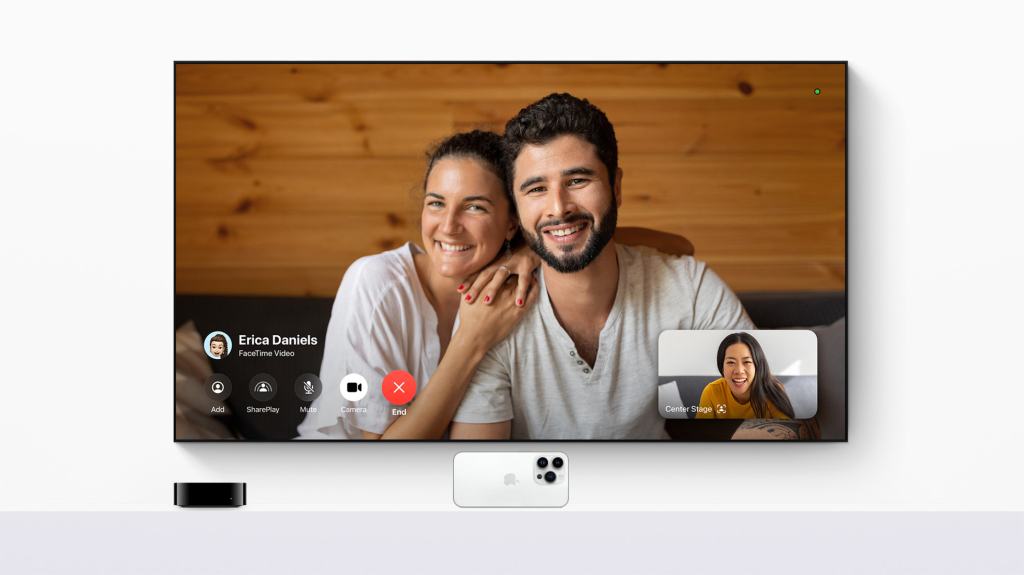
I think it is now time to move onto some new apps. Or app- singular. This year FaceTime will be coming to Apple TV. This works in a really fun way. You open the app and it prompts you connect to an iPhone or iPad and then it’ll open a Continuity Camera session putting your other devices video feed on the big screen. You can start a call from your recent FaceTime call history or search for another contact. You can turn Center Stage on or off, Portrait Mode on or off, and you can turn Reactions on or off. It all looks and works pretty nice.
You can even begin a SharePlay session from your FaceTime call and keep everyone on the call in a split view with whatever content you are SharePlaying. It’s really really cool and I cannot wait to use this feature with my family.
There are other new features concerning audio enhancements and VPN usage that I am unable to test as there is, to the best of my knowledge, no HomePod Beta Software for developers. And as VPN support will require an app download and no VPN apps are able to be listed on the tvOS App Store until later this fall, I also cannot test that.
The other thing I wanted to note is that I cannot confirm if all of these features will be coming to all Apple TV models. I have been using my second generation Apple TV 4K, but I do worry about the Apple TV HD and its ancient A8 chip with features like FaceTime and SharePlay. That’s a lot of system resources for what is basically the equivalent of an iPhone 6 to handle. Especially when iOS 17- which tvOS is forked off of- is only coming to devices with the A12 chip.
So overall, I am very positive about these changes. I like the new Home Screen grid and the redesigned Control Center is very nice. FaceTime on the Apple TV looks to be implemented in a really nice, social way. And it is great that all Apple TV models will get at least some improvement even 8 years later. And the features or changes I can’t test do sound good on paper. This probably is going to be the biggest tvOS update since tvOS 13.
However, I do wish that Apple had done a little more here. Multiuser support is unchanged- it remains as mildly frustrating as ever. Though it is easier to see whose account is being used which is a slight improvement. There still is no Screen Time support or additional profile account protections for adults or kids. I do feel like Apple addressing the long-distance social aspects of TV is great, but I hope next year they can focus more on the in-home social aspects of TV.
 Soul of Apple
Leave a comment